
One minute instead of one hour
You see what is missing while filling it in is still trivial.
You create an item because a customer is waiting on the phone, and fill in the rest later. By then the item has already run through a quote, an order and an invoice. AutoFlow checks the item master data as you enter it, points out what is missing straight away, and only lets the document through once it is complete.
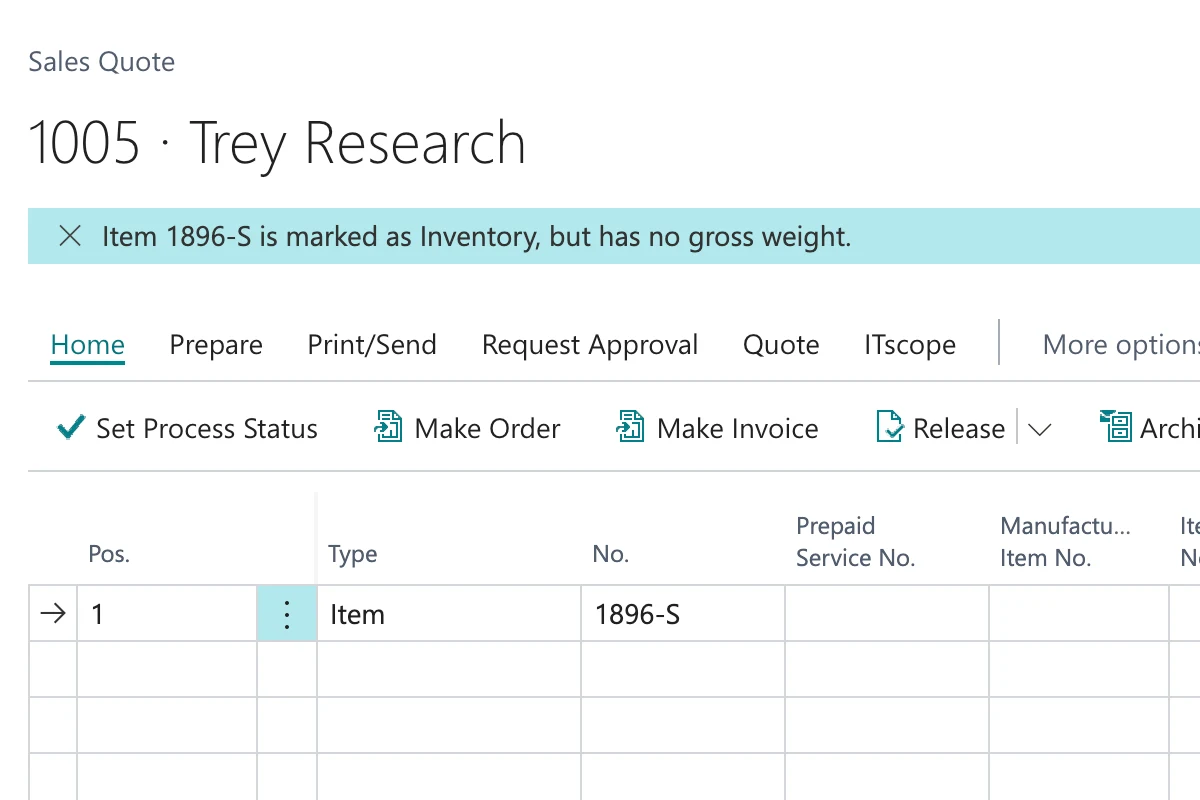
Business Central enforces exactly those fields it cannot do the arithmetic without — the posting groups, above all. Everything else stays optional: item tracking code, tariff number, country of origin, weight, item category.
In practice new items get created under time pressure and the rest is put off. The item goes straight into quotes, orders and invoices regardless. What is missing surfaces at month end in the Intrastat filing, on the freight invoice, or in the moment you have to trace a batch and find that none was ever recorded.
With no item tracking code the item is received and shipped without a lot or serial number. Once the first entry is posted, tracking cannot simply be retrofitted, and for everything moved up to that point there is no assignment at all. If you later have to narrow down a faulty delivery, the recall covers the whole period instead of a single lot.
What that costs: a multiple of the contained case. The scope is then set by the period the fault went unnoticed rather than by the fault itself — every delivery from it goes back, instead of the one affected lot.

Business Central checks the tariff number only when you generate the Intrastat filing. At that point it reports the gap for every affected item, and you research tariff number and country of origin after the fact for goods that reached the customer weeks ago. There is no check at posting time in the standard, and Microsoft turned down a proposal for one.
What that costs: at twelve filings a year and two hours of rework each, roughly 1,400 euros, for the retyping alone.

With weight and dimensions missing, your system calculates on one basis and your carrier invoices on another. The difference per shipment is small enough that it is rarely disputed, and large enough to add up over a year.
What that costs: at 1,500 shipments and 80 cents of average deviation, roughly 1,200 euros a year.

AutoFlow checks the item the moment you put it on a document line. If one of the fields you declared binding is missing, you get a notification in the document itself, with a jump to the item card. Dismissing it does not get you any further: at release and at posting the same check runs again, this time as an error listing exactly which fields are missing.
Which fields are mandatory is your decision, and you can decide it differently per item category. A traded good needs different data from a service.
You decide which fields an item must carry before it may be sold. Differently per item category where you need that.
As soon as the item lands on a document line, AutoFlow checks in the background and reports what is missing in the document. Your entry is not interrupted.
At release and at posting the same check runs again. If the fields are still missing you get an error naming exactly which ones.
A weekly run reports every incomplete item you already have, so you work through the backlog in one go instead of one interruption at a time.
You see what is missing while filling it in is still trivial.
While you type you only get a notification. Blocking happens at release and posting.
Traded goods, services and spare parts need different fields.
The message names the missing fields and links to where you enter them.
A collected run shows you which existing items are still incomplete.
Configured graphically — no AL, no extension, no deployment.
The logic sits beside Business Central as configuration, not inside the core as an object extension.
Trigger, condition, message: that is all the check is. No AL code, no extension, which is why it takes a morning rather than a project.
As soon as an item without a required entry lands on a document line, the notice appears in the sales document. The case in the screenshot above.
View templateThe same test at release, over every line of the sales document. If a required entry is still missing, the document does not go through.
View templateThe sweep over the item master: finds the incomplete items and sends them as a list, so the backlog gets cleared in one go.
View templateFewer than you think. The ones worth enforcing are those that are expensive or impossible to correct afterwards: item tracking code, tariff number and country of origin, weight. Enforce fifteen fields at once and within a week you have a team that dismisses the message without reading it.
For the posting groups, yes — you would not get through posting without them. For the tariff number the standard checks only when you generate the Intrastat filing, which is long after posting. A check at posting time was proposed to Microsoft and answered with the note that it is not on the roadmap. For the item tracking code there is no check at all.
At the start, yes, and that part is uncomfortable. The check finds every item that was already missing something without anyone noticing. That is what the collected run is for: clear the backlog first, then switch it on.
The same rule applies to them, deliberately. One-off items are the quickest to create and the most common source of gaps. If you do want to exempt them, you do it through the item category.
No. You build it graphically from ready-made blocks — no AL, no extension, no deployment. Anyone at home in Business Central who can describe the rule can build it. We'll sit in on your first flow if you want.
Nothing. The logic does not sit in the BC core as an object extension; it sits beside it as configuration. There is nothing to recompile at update time.
Yes, and we recommend it. Let the check do nothing but report for a few weeks. By then you know how often it fires and whether your rules are right, before anyone is sitting in front of an error.
The same process works there, with different mandatory fields. The more common case in purchasing, though, is a different one: a price that differs from your last order.
You can build and test in the sandbox as long as you like, without limits. And two active flows stay free forever in your production tenant — not a trial that runs out.