
Set it up once, then it holds for every invoice
The process is built in a day, SharePoint connection included. After that the same rule applies to every invoice, no matter who posts it, how full the day is, or who happens to be on holiday.
Every posted invoice lands automatically where it belongs — named by rule, findable from the document, with nobody exporting anything.

The document itself is cleanly posted in Business Central. The PDF the customer received and accounting has to keep is a different thing: it only exists once somebody creates it, and afterwards it sits wherever that person saved it.
Usually that is the right folder with a usable name. Sometimes it is the desktop, the sent items, or a folder that should not have survived the last reorganisation.
Any single search for a document only takes a few minutes. It is the questions around it that get expensive: someone looks, finds nothing, asks a colleague, and now two people are busy — often one from accounting and one from sales.

In an audit the question is not whether you have the documents, but whether you can present them completely and in order. Filing whose rule lives in one person's head is exactly what is hard to explain then — and the catching-up lands at a moment you do not choose.

As long as filing is convention rather than rule, it depends on the people who know the convention. A change in accounting then means not just onboarding but a transition period where nobody is quite sure where things go — and the documents from that period are the ones you cannot find later.

At fifty invoices a month, discipline holds. At five hundred it holds on good days. Exactly in the phase where more revenue is going through, more people are involved and there is less time for care, the filing becomes unreliable — that is, when it costs the most.

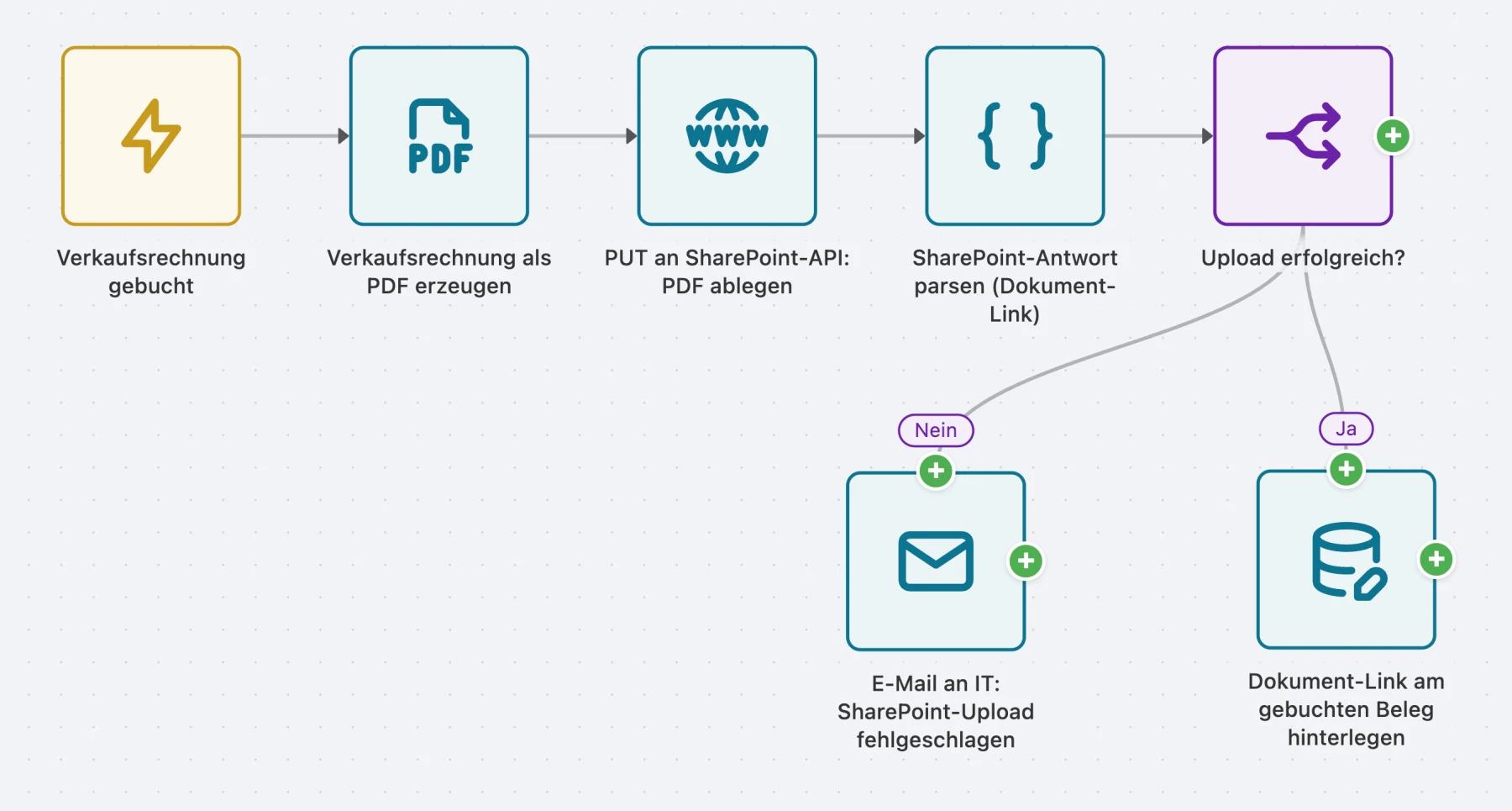
As soon as an invoice is posted, AutoFlow renders the PDF from the same report the customer gets, names it by a rule you define once, and files it in the folder the document itself determines: year, entity, customer — whatever drives your structure.
The step that makes the difference is the last one: the link goes back onto the posted document. Without it you would have tidy filing that nobody can find.
The process hangs off posting, not printing — so no document slips through.
From the report the customer also gets, with a name by your rule rather than by mood.
The path comes from the document itself — year, entity, customer, whatever applies at your company.
So nobody has to search: whoever has the document open has the file.
The process is built in a day, SharePoint connection included. After that the same rule applies to every invoice, no matter who posts it, how full the day is, or who happens to be on holiday.
Anyone with the document open in BC is one click from the PDF. It removes the searching, not just the filing.
Anything with an upload API works. SharePoint is just the case most people already licence.
If SharePoint does not answer, it is in the log and goes out as a message — it does not block the posting.
Purchase invoices, delivery notes, order confirmations: same process, different report and target folder.
The question “can you dig out that invoice for me” stops. Add up how often it comes up in a week and how many people each one occupies — the number is usually worse than expected, and it goes away from day one.
Post the invoice, render the PDF, upload it to SharePoint, store the link on the document. If the upload fails, IT gets a mail rather than nobody getting a notice.
The flow provides the precondition: every document is named by the same rule, filed in the same place and findable from the record — completely and traceably. Whether the filing as a whole meets your retention obligations is decided by the retention, versioning and permission settings of your SharePoint library, not by AutoFlow. That is a question for the configuration there — and one you have to answer anyway.
The process itself is done in a day. The part that takes time is usually not technical: you have to agree what the folder path and filename will be from now on. The flow can implement any rule; it cannot invent one.
Not for the process — that is built graphically. Once, though, you need someone with admin rights: access to SharePoint needs an Entra ID registration with write permission on the target library. That is half an hour of IT work, not development.
Nothing. There is no object extension to recompile. If anything changes it is more likely on the other side — if you restructure SharePoint, you adjust the path in the flow, and that is a field, not a ticket.
This process does not catch up on them, because it hangs off posting. For the backlog you build a second flow that walks a date range and uses the same filing logic. That is the same effort again, but only once.
It should not, and in our setup it does not. The invoice is correct; only the copy is missing. The failed step is logged and reported so someone can redo it. A process that halts posting because someone else's system is slow gets switched off after the second incident.
You can build and test in the sandbox as long as you like, without limits. And two active flows stay free forever in your production tenant — not a trial that runs out.

When stock drops below the reorder point, AutoFlow checks open orders and creates the matching purchase order automatically.
Read the use case
A ticket in an external system creates a Business Central service order by webhook — matching the customer and checking their contract.
Read the use case