
Response from the report, not from the handling
The order appears in the moment the ticket appears — at night, at the weekend, during the team meeting. The time that used to disappear between the report and the record is back for the actual work.
The ticket becomes the order the moment the ticket appears — with the right customer, the right contract, and nobody typing it a second time.

The ticket is there, with a description, a priority and a customer number. Until it becomes a service order in Business Central somebody has to retype it — and until that happens the job simply does not exist for dispatch, for billing or for any report.
When the customer asks where things stand, the answer is that someone will have to check. And checking means: in a different system from the one the order should be in.
Response times are in the contract, but the clock starts at the report — not at the moment somebody transfers it. Every hour a ticket sits untransferred comes off the time you have for the actual work. With tight commitments, that hour is the one that decides.

If the order is created without reference to the maintenance contract, it gets billed wrong — sometimes against the customer, sometimes against you. And anything that never becomes an order at all, because the ticket got lost in the day, appears on no invoice. These are not large amounts per case; there are just a lot of cases.

Because nobody is sure whether it has been transferred, a second person transfers it to be safe. Then two appointments go out for the same problem, or the customer gets two responses to one incident. That does not just cost time, it costs confidence — and in service, confidence is the product.

The transfer scales linearly with ticket volume and depends on a handful of people. When the service side grows, the back office grows first — before the extra revenue arrives. That is exactly the point at which companies stop actively selling service contracts.

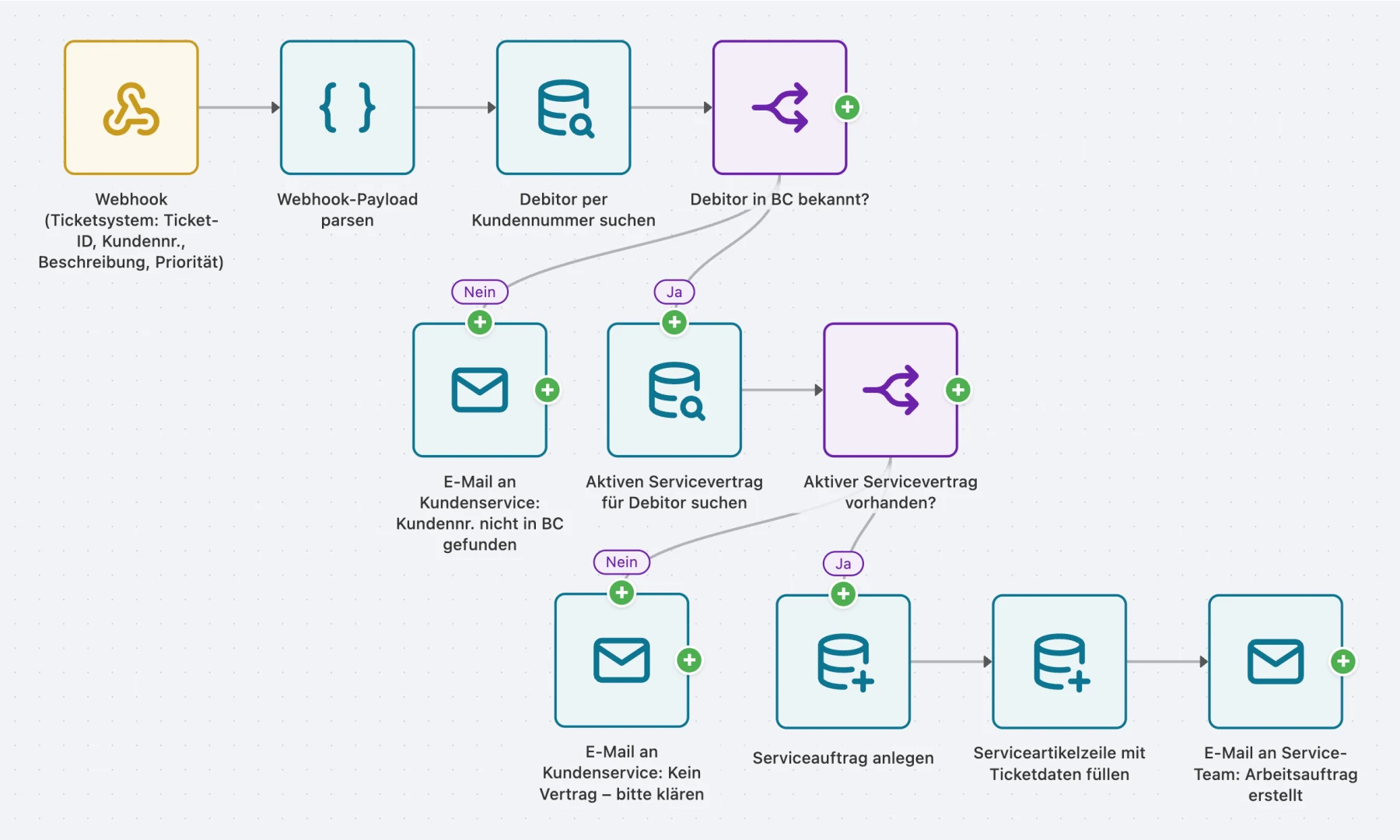
As soon as a ticket appears, the ticketing system tells AutoFlow. The process looks up the matching customer, checks whether an active service contract exists, and creates the order with the description from the ticket — carrying the ticket number as a reference, so it is later clear what belongs to what.
The most important part is what the process does not do: if it cannot find the customer, it does not guess. It reports the case to the office with the full ticket, so a person can assign it.
The ticketing system reports as soon as a case appears. Nobody has to watch an inbox.
If the customer number matches nobody, there is no guessing — the case goes to the office in full.
An active service contract determines how the order is created and how it is billed later.
With the description from the ticket and its number as a reference — schedulable and billable.
The order appears in the moment the ticket appears — at night, at the weekend, during the team meeting. The time that used to disappear between the report and the record is back for the actual work.
The ticket number on the order answers whether the case already exists. A second call changes nothing.
The contract link is checked when the order is created, not patched in at billing time.
Anything that can send a webhook works — and practically every ticketing system can.
Unknown customer or unexpected fields: the case goes to a person rather than into half an order.
At month end. When the clean-up does not happen — no hunting for jobs without an order, no correcting mis-assigned contracts, no argument about duplicate visits — the process has returned more than the two days it cost.
The ticket arrives by webhook, the customer is looked up, the service contract checked, the service order created. Anything that does not go through reaches customer service as a mail rather than disappearing.
The process is built in one to two days. The honest caveat: it stands or falls on the mapping between the customer in the ticketing system and the customer in BC. If that exists cleanly, it is quick. If not, that mapping is the actual job — and it would need doing without AutoFlow too.
Not for the process. What you need is someone allowed to set up a webhook in the ticketing system — usually a checkbox and a URL. Reading the message and creating the order you click together graphically, without code.
Nothing. There is no extension in the BC core to recompile. If something changes it is more likely on the ticketing side — and if that starts sending different fields, the process goes down the error branch rather than creating a half-filled order.
The process creates nothing. It sends the full ticket to a configured address so a person can assign it. That sounds like a gap but it is deliberate: an order automatically created against the wrong customer costs more time than it saves — and often only surfaces at billing.
The call has to be authenticated; without valid credentials nothing happens. On top of that the process checks whether the message is plausible rather than trusting anyone who knows the URL. What arrives is in the log — including what was rejected.
Yes, that is the other direction and a process of its own. It is worth building one direction first and running it for a few weeks — the callback is worth much less while the outbound path is not yet reliable.
You can build and test in the sandbox as long as you like, without limits. And two active flows stay free forever in your production tenant — not a trial that runs out.

When a sales invoice is posted, AutoFlow renders the PDF, files it in the right SharePoint folder and writes the link back onto the document.
Read the use case
When stock drops below the reorder point, AutoFlow checks open orders and creates the matching purchase order automatically.
Read the use case