
Now, not months later
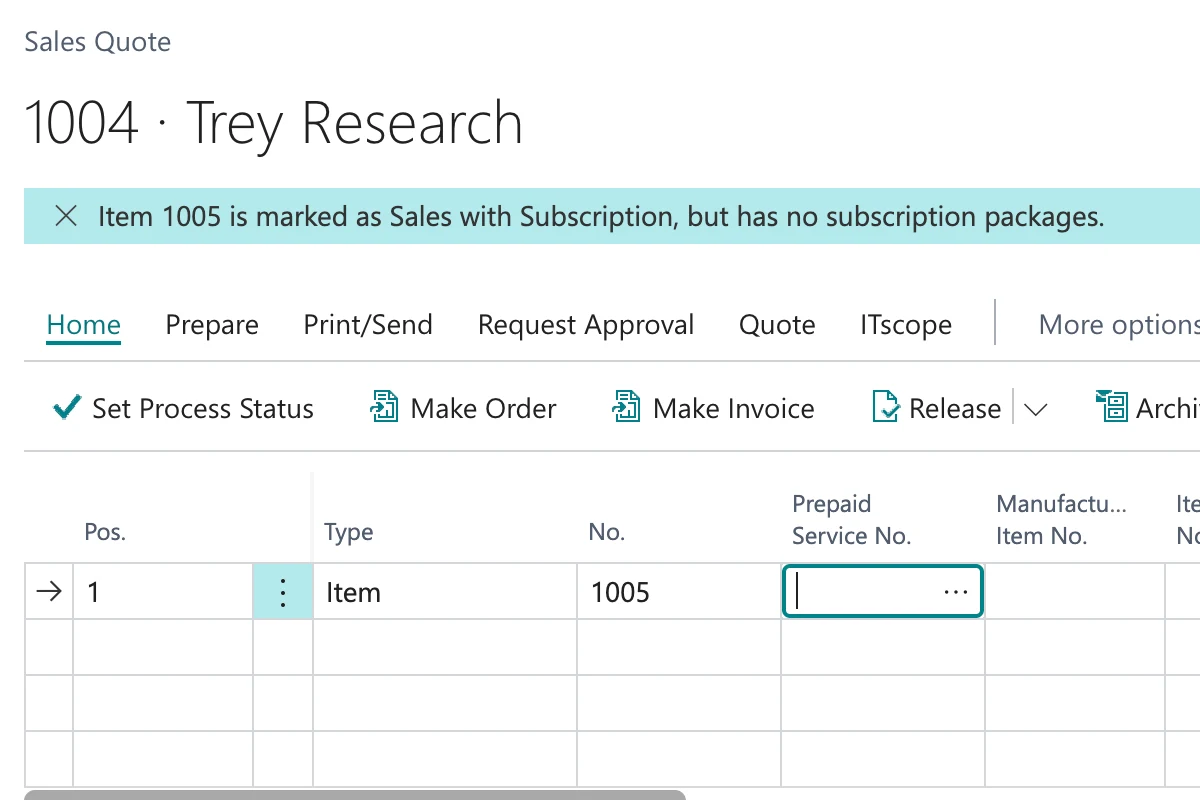
The notification comes as you enter the line, not when someone reads the annual figures.
With a subscription item the revenue sits in the subscription, not in the document line. If the subscription package is missing, you can end up posting an order that produces no revenue at all. AutoFlow reports missing packages as you enter them, checks every line at release, and finds subscriptions left without a contract after delivery.
Business Central creates subscription lines automatically only where the package on the item is flagged as standard. For optional packages a dialog opens during entry, and it closes again with Escape. If the item carries no package at all, nothing happens in any case.
In all three cases you get an order that looks correct and posts cleanly. The line is missing only months later, when somebody looks at recurring revenue — and then the question on the table is whether you invoice a year in arrears.
With a pure subscription item the revenue sits in the subscription, not in the unit price on the document line. With no package there is neither a subscription line nor a one-off revenue. The document still posts, the invoice still goes out, and the books carry nothing for that line.
What that costs: at 80 euros a month over a three-year term, roughly 2,900 euros per case. Five cases a year is roughly 14,000 euros out of a single year's intake.

Even where the subscription lines are created, nothing happens without an assignment to a contract. Billing runs through the contract, and a subscription without one sits in the system without ever appearing in a billing run. Nothing about it stands out, because no error occurs and no message appears.
What that costs: the same order of magnitude, with the difference that the service is already being delivered.

If it surfaces after twelve months you have two bad options: invoice in arrears and annoy the customer, or let it go and write the revenue off. Either way your accruals and your revenue recognition for the period are wrong.

AutoFlow works at three points, and none of them blocks you. As a subscription item goes onto a line, AutoFlow reports immediately if the item carries no subscription package at all. At release every line is checked, and each subscription line without a subscription gets its own notification.
It stays at notifications deliberately, because there are good reasons to sell a subscription item once — a replacement delivery, or a gesture of goodwill. The third process runs in the background and reports subscriptions whose lines belong to no contract, before the first billing date passes.
When a subscription item with no package at all lands on a document line, AutoFlow reports it straight away. The mistake becomes visible where it is made.
At release AutoFlow searches the document for subscription items and checks each line for a subscription line. Every affected line gets its own notification.
A recurring run finds subscriptions whose lines belong to no contract, and reports them with customer, item and start date.
The notification comes as you enter the line, not when someone reads the annual figures.
At release each affected line gets its own message, rather than one warning covering all of them.
Only what you are actually selling is reported. Dormant items stay quiet.
The recurring run finds what sits in the system and is never billed.
You are told, not stopped. Selling one outright stays possible.
Configured graphically — no AL, no extension, no deployment.
Three small processes, built from ready-made blocks: trigger, condition, message. No AL code, no extension — so it is set up in a day rather than in a project.
Walks every line of a sales document as it is entered and reports the ones where the subscription line is missing.
View templateReports items marked as sales with subscription that carry no subscription package. The case in the screenshot above.
View templateFinds subscriptions that were never assigned to a contract and sends them as a list by email.
View templateIt happens precisely when somebody is working quickly. The assignment dialog for optional subscription packages opens in the middle of entry and can be dismissed like any other dialog. After that the order looks entirely normal.
From the field on the item. Business Central already flags subscription items itself, so no extra classification and no category of your own needs maintaining.
Because every dormant record would come with it. An old subscription item with no package that nobody has sold in two years bothers nobody. Report it weekly and the cases where money is actually at stake get lost among them. So only what actually lands on a document is checked.
Yes, which is why it stays at a notification. Replacements, goodwill cases and follow-up deliveries have to be able to run without a subscription. Nothing is blocked anywhere.
Standard packages are pulled in automatically, and that works. For optional packages, and for subscriptions with no contract assigned, there is no check — and neither produces an error.
The process describes subscription billing in standard Business Central. The pattern works the same way with other solutions — their fields get checked instead of the standard ones.
No. You build it graphically from ready-made blocks — no AL, no extension, no deployment. Anyone at home in Business Central who can describe the rule can build it. We'll sit in on your first flow if you want.
Nothing. The logic does not sit in the BC core as an object extension; it sits beside it as configuration. There is nothing to recompile at update time.
You can build and test in the sandbox as long as you like, without limits. And two active flows stay free forever in your production tenant — not a trial that runs out.